A detailed walkthrough of how the GCC compiler converts your C code into an executable binary — from preprocessor to linker, multi-language projects, and the ABI.
The Journey from Code to Binary
Have you ever wondered what actually happens when you hit that compile button or run gcc main.c? Like, your C code magically becomes a binary that the machine can run. But it's not magic at all there's a whole pipeline of steps that your code goes through before it becomes an executable.
And trust me, once you understand this pipeline, you'll look at compilation very differently. It gives you so much power to manipulate and combine things. Let's break it down.
Friendly Note: This is not a textbook explaination. It's how I understand it, so it may have some of my own ideas mixed in.
Two Types of Programming Languages
Before we jump into GCC, let's quickly talk about the two types of programming languages out there.
-
Compiled Languages
These are the languages where the source code is fully converted into machine code (binary) before you run it. The compilation happens once, and then you can run the binary as many times as you want without recompiling.
Examples: C, C++, Go, Rust, and Java (well, Java is a bit special it compiles to bytecode, not directly to machine code, but let's not go there for now).
-
Interpreted Languages
These are the languages where the code is read and executed line by line at runtime. There's no separate compilation step the interpreter does the job on the fly.
Examples: Python, JavaScript, and most scripting languages.
The key difference? Compiled languages go through this whole compilation pipeline we're about to discuss. Interpreted languages skip most of it and just execute directly through an interpreter.
For this blog, we're going to focus on compiled languages specifically C with the GCC compiler.
What is GCC?
GCC originally stood for GNU C Compiler because it was built to compile C code. But over time it evolved to support C++, Fortran, Go, and other languages. So now it stands for GNU Compiler Collection.
But the core idea remains the same it takes your source code and converts it into an executable binary. The thing is, it doesn't do it in one shot. It won't just magically convert your C code into machine code directly.
It actually goes through a step-by-step process to compile. And at the final result, we can able to get an executable.
How these things are getting processed? Let's see.
Steps to go for an Executable
This is the main part. When you compile a C program, it goes through 4 stages:
- Preprocessor
- Compiler
- Assembler
- Linker
Each stage takes an input, does its job, and produces an output that feeds into the next stage. Think of it like a factory assembly line raw material goes in one end, and a finished product comes out the other.
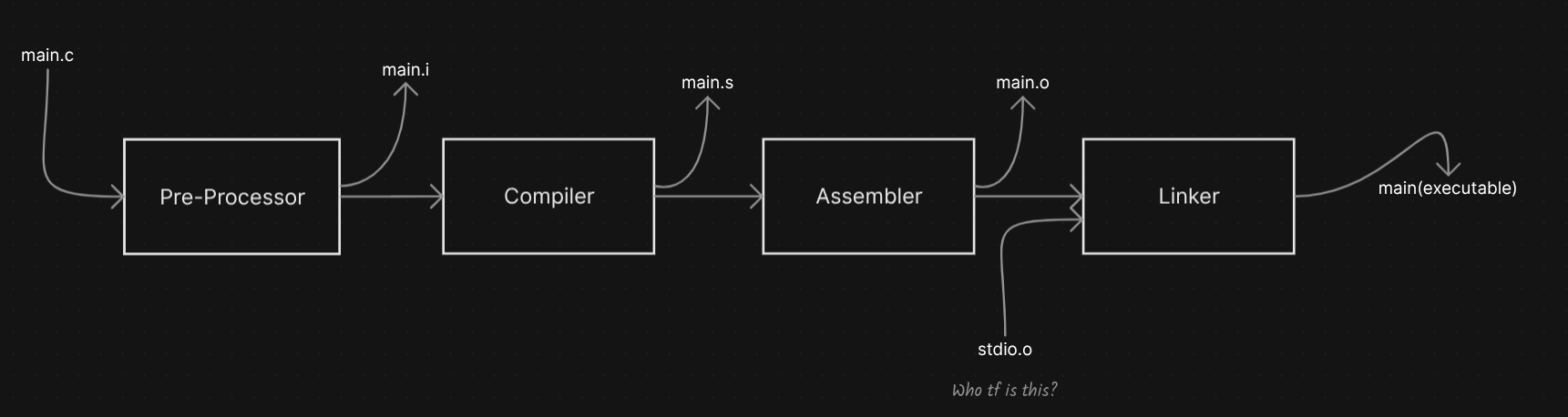
Let me walk you through each one.
Preprocessor
The preprocessor is the first guy in the pipeline. Your main.c goes through the preprocessor, and it does some pretty important housekeeping stuff:
- Removing the comments : All your
//and/* */comments? Gone. The machine doesn't care about your "TODO: fix this later" notes. Poofff... - Expanding the macros : If you have
#define MAX 100, every occurrence ofMAXin your code gets replaced with100. Simple text substitution. - Replacing the header files with their content : When you write
#include <stdio.h>, the preprocessor literally takes the entire content ofstdio.hand pastes it into your file. Yeah, that one line becomes thousands of lines.
And finally it gives you a fully structured C code with no comments, all macros expanded, and all headers included. It's still C code -just a clean, expanded version of it.
The output file will be main.i.
You can actually see this yourself by running:
gcc -E main.c -o main.i
The -E flag tells GCC to stop after preprocessing. Go ahead and open that main.i file , you'll be surprised how big it is. A simple "Hello World" program becomes thousands of lines after the preprocessor includes all the header content. Pretty crazy right?
Compiler
Now here comes the real deal. The compiler takes the preprocessed file main.i and does the actual heavy lifting.
But wait, it doesn't change it directly to machine code. A lot of people think the "compiler" step produces the final binary. Nope. It first changes it into another human readable form called assembly.
So what exactly does the compiler do?
- Syntax checking :c It checks your code to make sure there are no syntax errors or issues. Missing semicolons, wrong types, undeclared variables , all of that gets caught here.
- Semantic analysis : Beyond syntax, it also checks if what you're doing makes logical sense. Like, are you trying to add an integer to a string? That's a semantic error.
- Optimization : The compiler is smart. It will try to optimize your code to make it run faster or use less memory. There are different levels of optimization (
-O1,-O2,-O3) that you can control. - Code generation : Finally, it generates the assembly code. This is a human-readable form of instructions that are specific to your CPU architecture.
The output will be main.s : an assembly file.
You can generate just the assembly by running:
gcc -S main.c -o main.s
The assembly code looks something like this (for x86):
    .text
    .globl main
main:
    pushq   %rbp
    movq    %rsp, %rbp
    movl    $0, %eax
    popq    %rbp
    ret
I know it looks scary, but it's actually a specific set of instructions that the CPU understands in a human-readable way. Each line is an instruction , push something to the stack, move something to a register, return from the function. That's it.
The point is, the compiler converts your high-level C code into this low-level assembly language that is closer to what the machine actually executes. But it's still not machine code yet.
Assembler
This is the actual part where the code transforms into something the machine can read. The assembler takes the main.s assembly file and converts it into machine code , actual binary instructions that the CPU can execute.
The output is called an object file main.o.
gcc -c main.c -o main.o
This is the core of every program. The object file contains the raw machine code for YOUR code. But here's the thing, it's not yet a complete executable. Why?
Because your code probably uses functions from standard libraries. Like printf from stdio.h. The object file has your code compiled, but it doesn't have the actual implementation of printf in it. It just has a reference saying "hey, I need this function from somewhere."
That's where the next stage comes in.
Think of it this way: The object file is like a puzzle piece. It's a complete piece on its own, but it needs other pieces (libraries) to form the full picture.
Linker
The linker is the final boss. This is where everything comes together.
When you compile your C program and you get the object file, you still need the standard library files. Like, you use stdio.h for printf, right? So where does the actual code for printf come from?
The linker takes your object file and links it with the required library files to produce the final executable binary.
But here's the interesting part, there are 2 types of linking:
Static Linking
In static linking, the standard library code is directly copied into your executable binary. Like, literally pasted in. Wherever printf is called, the actual implementation of printf from the standard library .a file gets embedded into your binary.
Your code (main.o) + Library code (libc.a) = One big executable binary
Sounds simple right? But there's a problem.
If you have multiple programs on your system and all of them use printf, each one will have its own copy of printf inside their binary. That's a lot of duplicated code sitting on your disk and in memory.
And the binary size? It becomes huge. Because you're carrying all the library code inside your executable. If you depend on having a binary which will always have heavy dependency on standard libraries, static linking will not be a good option.
Pros:
- Self-contained binary, you can run it anywhere without worrying about library versions
- No runtime dependency issues
- Slightly faster at runtime (no need to look up library functions)
Cons:
- Larger binary size
- Duplicated code across multiple programs
- If a library has a security fix, you need to recompile everything
Dynamic Linking
Dynamic linking is the smarter approach. Instead of copying the library code into your binary, it just stores a reference (address) to the standard library.
So when your program runs and needs printf, it will just ask the OS , "Hey, load this standard library into my process memory and link it for me." The OS loads the shared library (.so file on Linux, .dll on Windows) into the address space of the process, and it will be linked together at runtime.
Your code (main.o) + Reference to library (libc.so) = Small executable binary
The beauty of this is that multiple programs can share the same library in memory. If 10 programs need printf, the OS loads libc.so once and all 10 programs share it. Memory saved. Disk space saved. Everyone's happy.
Pros:
- Smaller binary size
- Shared libraries in memory , efficient
- Library updates don't require recompilation
Cons:
- Runtime dependency, if the shared library is missing or a different version, your program crashes
- Slightly slower at startup (need to resolve library addresses)
Most modern systems use dynamic linking by default. That's why you sometimes see errors like "shared library not found", it's because the linker expected a .so file at runtime and couldn't find it.
Crazy Fact: On Linux, you can check which shared libraries a binary depends on using the
lddcommand. Tryldd /bin/lsand see how many libraries even a simplelscommand needs!
So that's the full pipeline. Your main.c goes through:
main.c -> Preprocessor -> main.i -> Compiler -> main.s -> Assembler -> main.o -> Linker -> executable binary
Each step takes the output of the previous step and transforms it further until you get the final executable. Pretty elegant right?
Multi-Language Projects
Ok so this is where it gets really interesting. You often see in real projects, there will be multiple languages combined together. Like you can see assembly and C, or C and Rust, connecting more languages into one project.
How can they do it? How will they do it?
It's actually simpler than you think. And the secret lies in that compilation pipeline we just discussed.
Breaking Down the Pipeline
Remember those 4 stages, preprocessor, compiler, assembler, linker? Here's the cool part: you can stop at any intermediate step.
You don't have to run the full pipeline in one shot. You can stop before the assembler, or stop before the linker. You can take the intermediate output and do whatever you want with it.
This is the key insight. These compilation steps can be broken down into parts, and you can manipulate them at your will.
The Add Function Example
Let me give you a practical example. Let's say we want to add two numbers with an add function.
Here's the plan:
- I will implement the
addfunction in assembly code - I will write the main logic and everything else in C
- And I will just mention that "hey, the
addfunction will come from that assembly code"
The C code (main.c):
#include <stdio.h>

// Declaring that add function exists somewhere else (in our assembly file)
extern int add(int a, int b);

int main() {
    int result = add(5, 3);
    printf("Result: %d\n", result);
    return 0;
}
The Assembly code (add.s):
    .globl add
add:
    mov %edi %eax
    add %esi %eax
    ret
Now here's how we combine them:
- First, we compile the C code but stop before the linker, we just get the object file:
gcc -c main.c -o main.o
- Then we assemble the assembly code to get its object file:
as add.s -o add.o #as -> GNU assembler
- Now we link both object files together:
gcc main.o add.o -o program
And boom , you got a binary with both C and assembly combined. Congratulations!
Or just directly pass the values to gcc, it will do the rest.
gcc main.c add.s -o main
The linker doesn't care where the object files came from. It just sees object files with machine code and symbols (function names) that need to be resolved. It connects them together and gives you the final binary.
Why Do Projects Use Multiple Languages?
This is a very valid question. Why not just write everything in one language?
The answer is simple, each language has its strengths.
You could put the core logic in a high-level language like C or Go (for readability and ease of development) and the performance-critical operations in assembly (for maximum speed and hardware control).
Most of the programming languages, they have some backend in assembly. Like Linux kernel , it's mostly coded in C, but the performance-critical operations will always be coded in assembly. Because you know, the most optimized APIs will be in assembly and you don't have to rewrite that in C.
That's why they have made it possible, you can always take that assembly code and connect it with C or any other language. You can run anything in your code as you want.
Some real-world examples:
| Project | Languages Combined | Why? |
|---|---|---|
| Linux Kernel | C + Assembly | Core in C, hardware/perf-critical in Assembly |
| CPython | C + Python | Interpreter in C, scripting in Python |
| Firefox | C++ + Rust + JavaScript | Legacy in C++, safe components in Rust, web scripting in JS |
| Go Runtime | Go + Assembly | Runtime in Go, low-level scheduler/GC in Assembly |
The point is, this ability to break the compilation pipeline into parts and link different languages together is what makes systems programming so powerful.
The Problem: How Do Languages Talk to Each Other?
Now hold on. This sounds too easy right? Just compile separately and link together? There's a catch.
Think about it. When two different languages generate assembly code, they might do things differently. And this creates ambiguity. Let me explain with two cases.
Case 1: Register Conventions
Let's say we have an add(a, b) function implemented in two different languages.
Language A's assembly:
; Language A puts 'a' in R0, 'b' in R1
; And returns the result in R3
add:
    ADD R3, R0, R1    ; R3 = R0 + R1
    RET
Language B's assembly:
; Language B puts 'a' in R1, 'b' in R2
; And returns the result in R0
add:
    ADD R0, R1, R2    ; R0 = R1 + R2
    RET
See the problem? Language A stores the parameters in R0 and R1 and puts the result in R3. But Language B uses R1 and R2 for parameters and puts the result in R0.
If Language A calls Language B's add function, it will put the values in R0 and R1, but Language B expects them in R1 and R2. It doesn't know which register to get the values from and which register to put the result. Complete chaos.
Case 2: Value vs Reference
Here's another tricky case. Let's say Language A uses call by value , it stores the actual value in the register. So if a = 5, the register literally holds the number 5.
But Language B assumes call by reference, it expects the register to hold the memory address where the value is stored. So it reads the register, gets 5, and treats it as a memory address. It goes to memory address 5 and tries to read the value from there.
That's a disaster. It will either crash or give completely wrong results. Because one language is passing the actual data, and the other is treating it as a pointer.
More Cases
And there will be even more cases if you think about it:
- Stack frame layout : Different languages might push function arguments onto the stack in different orders (left-to-right vs right-to-left)
- Who cleans up the stack : After a function call, does the caller clean up the stack or the callee? Different languages, different conventions
- Name mangling : C++ mangles function names to support overloading (
addbecomes something like_Z3addii), while C doesn't. So the linker might not find matching symbols
So there must be a standard, some common ground that all languages agree to follow when they generate machine code. Otherwise, combining languages would be impossible.
ABI - Application Binary Interface
And that standard is called the ABI Application Binary Interface.
The ABI is basically a contract. It defines the rules that programs must follow to communicate with each other at the binary level. Think of it like a protocol, just like how HTTP defines how a browser talks to a server, ABI defines how compiled code from different languages talks to each other.
The programs must implement these standards and conventions to actually communicate with each other.
What does the ABI define?
- Calling conventions : Which registers hold function arguments? In what order? Where does the return value go?
- Register usage : Which registers are caller-saved (the caller must save them before calling) and which are callee-saved (the called function must preserve them)?
- Stack frame layout : How is the stack organized during a function call? Where are local variables? Where is the return address?
- Data types and alignment : How big is an
int? How are structs laid out in memory? What alignment do they need? - **Name mangling **rules : How are function names represented in the object file?
- System call interface : How does user code call into the kernel?
For example, on x86-64 Linux, the System V ABI says:
- First 6 integer arguments go in registers:
RDI,RSI,RDX,RCX,R8,R9 - Return value goes in
RAX - The caller is responsible for cleaning up the stack
So if both Language A and Language B follow the System V ABI, they'll agree on where to put function arguments and where to find the return value. No ambiguity. No chaos. Everything works together.
Think of it this way: ABI is like the electrical socket standard in your country. Every device (language) must use the same plug format (ABI) to connect to the power outlet (hardware). If everyone follows the same standard, any device works with any outlet.
That's why when you compile C code with GCC on x86-64 Linux, and compile Rust code with rustc on the same platform, and link them together, it works. Because both compilers generate code that follows the same ABI.
Compilers Are Not All the Same
One important thing to keep in mind, the compilers for each language has a different flow, like Rust, will cover that later. The way GCC compiles C is not the same way rustc compiles Rust, or how the Go compiler compiles Go.
Each compiler has its own:
- Frontend : parsing the specific language syntax
- Intermediate representation : how it represents code internally for optimization
- Backend : how it generates assembly for the target architecture
- Optimization passes : different compilers optimize differently
For example, Rust's compiler (rustc) goes through an additional borrow-checking phase that C doesn't have. Go's compiler is designed for fast compilation and has a different optimization strategy than GCC.
But here's the beautiful part : each and every language has its own type of compiling, but linking will most probably be the same. Because at the end of the day, all compilers produce object files with machine code that follows the platform's ABI. And the linker just connects those object files together.
That's the elegance of the system. Different compilers, different languages, different philosophies : but they all converge at the linker through a common standard.
Summary
So to wrap it all up, here's the full picture:
The GCC Pipeline:
Source Code (.c)
    ↓ Preprocessor (removes comments, expands macros, includes headers)
Preprocessed Code (.i)
    ↓ Compiler (syntax check, converts to assembly)
Assembly Code (.s)
    ↓ Assembler (converts to machine code)
Object File (.o)
    ↓ Linker (links with libraries, resolves symbols)
Executable Binary
Linking types:
- Static -> Library code copied into binary. Self-contained but heavy.
- Dynamic -> Library loaded at runtime. Lightweight but has dependencies.
Multi-language projects:
- Break the pipeline at intermediate steps
- Get object files from different languages
- Link them together with the linker
ABI (Application Binary Interface):
- The standard that makes cross-language linking possible
- Defines register conventions, calling conventions, stack layout
- Without ABI, languages can't communicate at the binary level
This is how a main.c goes from something you wrote to something your machine can execute. And this is how projects combine C, assembly, Rust, Go, and other languages into a single binary.
The compilation pipeline is one of those things that once you understand, you'll have a much deeper appreciation for what happens behind the scenes every time you run gcc main.c -o main.
Will see you in the next one :-)