System I/O - How Linux Reads and Writes Files
A deep dive into how System I/O works in Linux - from file descriptors to kernel data structures, fork sharing, dup2 redirection, and pipes.
How Linux Reads and Writes Files
What is the System I/O? It's just the input and output of the file. That's it. The way the OS and kernel programs do the file reading and writing. How do you store a file? How do you read a file? How do you write a file? How do you open and close? It's just the ways of kernel things right?
But here's the fun part. Did you know that network is just a file? And IPC (Inter-Process Communication) is also just a file? They are going to communicate with just a file. Yes, literally. The network is going to use the file to input the data and another program is going to read the file and take the data. It's just that simple.
Everything in Linux is a file. And once you understand how files work at the system level, you pretty much understand how most of Linux works.
Note: This is my understanding from the CMU lecture on System I/O and some of my own findings. Don't consider it as a perfect replica.
Two Types of I/O
So there are 2 types of I/O - Unix I/O and Standard I/O.
What is it? What is it matter? Which one comes first? What is the advantage of both?
Okay let's not worry about which came first. The important thing is: Unix I/O is the base for all I/O operations. Back in the day, we were using Unix I/O directly. Later, the GNU libraries came and gave us Standard I/O (like printf, fopen, etc.) as a wrapper on top.
I'll get into the details later. For now just know these basic functions:
Unix I/O: open, close, read, write, lseek, stat
Standard I/O: fopen, fclose, fread, fwrite, fprintf, fscanf
And there's this important thing called a file descriptor. For now, just think of your file descriptor as a token to access a file. I'll explain what it actually is and how it works in the next section.
So when you open a file, the OS gives you a file token (file descriptor). With that token, you can read, write, or seek to any offset in the file. You can use lseek to jump to a specific position. Pretty straightforward right?
Why Do We Need 2 I/Os?
Actually, there are not 2 separate I/Os. The Standard I/O is basically a wrapper of Unix I/O. The only question is - why do we need a wrapper?
Think of it this way. Unix I/O is just pure system calls, pure kernel system calls. And each system call will take at least 10,000 clock cycles to access a single file or something. That's expensive.
Let me give you an example to understand why.
If you want to read data from a terminal using Unix I/O, you have to loop through character by character and get the data. Here's the code:
char c;
while (read(STDIN_FILENO, &c, 1) != 0) {
    write(STDOUT_FILENO, &c, 1);
}
See this? We are reading byte by byte. Each read call is a system call. Each write call is a system call. So if each system call takes at least 10,000 CPU cycles, we are burning cycles for every single byte. That is insanely costly. Having to do it as single byte syscalls is a horror show.
Reading "Hello\n" byte by byte:

  read(0, &c, 1)  -> 'H'    ~10,000 cycles
  write(1, &c, 1) -> 'H'    ~10,000 cycles
  read(0, &c, 1)  -> 'e'    ~10,000 cycles
  write(1, &c, 1) -> 'e'    ~10,000 cycles
  read(0, &c, 1)  -> 'l'    ~10,000 cycles
  write(1, &c, 1) -> 'l'    ~10,000 cycles
  ...

  Total for "Hello\n" = 12 syscalls = ~120,000 cycles
So Unix I/O is just the base of every I/O that you are going to write. You can write your own I/O on top of it, but Standard I/O is basically the wrapper of Unix I/O which handles this buffering case.
Use strace to know the internal syscalls happening. Used strace ./mainto know the system calls.
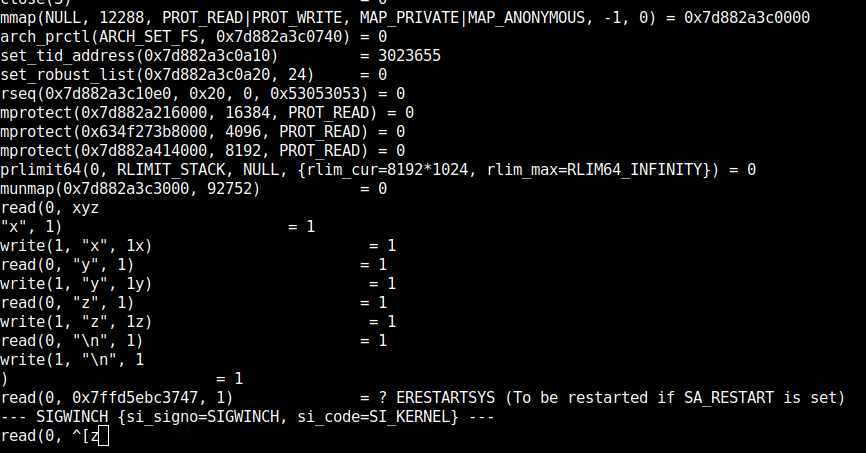
The same example with Standard I/O? You just use printf. The printf function is actually a Standard I/O function. It will buffer the characters and wait. Before the \n (newline), it buffers everything into memory. When it sees the \n, it flushes the whole buffer in one single write syscall.
Using printf("Hello\n"):

  printf("H")  -> buffer    0 syscalls
  printf("e")  -> buffer    0 syscalls
  printf("l")  -> buffer    0 syscalls
  printf("l")  -> buffer    0 syscalls
  printf("o")  -> buffer    0 syscalls
  printf("\n") -> FLUSH!     1 write syscall = ~10,000 cycles

  Total = 1 syscall = ~10,000 cycles
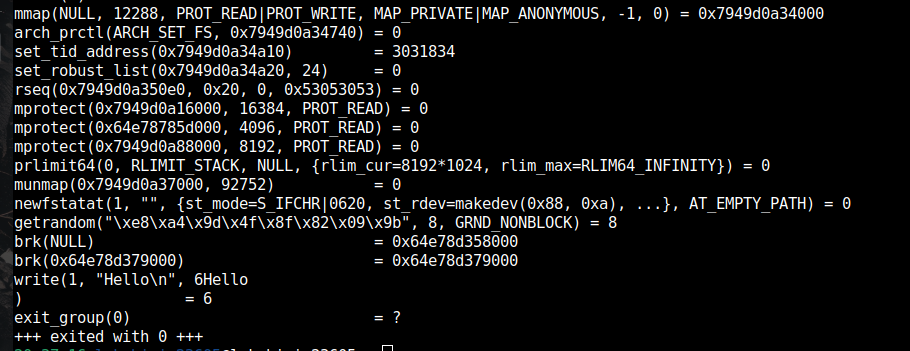
See the difference? Pretty bad right? 120,000 cycles vs 10,000 cycles. That's 12x more expensive just for "Hello".
You can actually verify this using strace. If you run strace on a program using Unix I/O byte by byte, you can see how many syscalls it makes. And when you use Standard I/O, it makes one syscall per line.
Also, if you're using Unix I/O directly, you have to manage the flush function yourself. You have to do it yourself. But in Standard I/O, it's already handling it on its own. So we don't have to worry about that.
Unix I/O vs Standard I/O Comparison
| Feature | Unix I/O | Standard I/O |
|---|---|---|
| Functions | open, read, write, close, lseek | fopen, fprintf, fread, fclose |
| Returns | File descriptor (int) | FILE * pointer |
| Buffering | No (you manage it) | Yes (automatic) |
| Seeking | Manual with lseek | fseek / ftell |
| Flushing | You handle it | Automatic on \n, fflush(), or exit() |
| Short count handling | You handle it | Handled for you |
| Signal safe | Yes | No |
| Network safe | Yes | No |
| Control | Full control | Less control, more convenience |
So to summarize - Unix I/O gives you a standard way of doing disk operations directly. You don't need buffering? Cool. You manage everything yourself. Standard I/O automatically comes with buffering, seeking, flushing out of the box.
But when you use Unix I/O, it's more flexible. You have your own buffering management, seeking, flushing, end of file handling, short reads... I'll talk about short reads later in this blog.
The Three Kernel Tables
Now here comes the really interesting part. How is your file actually stored and managed in the Linux system? I always wondered about this.
There are 3 tables you have to know about. These tables are everything.
- Per-Process File Descriptor Table
- System-Wide Open File Table
- V-Node / Inode Table
Let's go one by one.
But First - stdin, stdout, stderr
Before I explain the file descriptor table, let me tell you something important that I should have mentioned earlier.
Every process in Linux starts with 3 files already open:
+-----+------------------+
| fd  | What it is       |
+-----+------------------+
|  0  | stdin  (input)   |
|  1  | stdout (output)  |
|  2  | stderr (error)   |
+-----+------------------+
Yes, stdin, stdout, and stderr are just files. They are file descriptors 0, 1, and 2 in every single process. When you do printf("hello"), it's writing to file descriptor 1 (stdout). When you do scanf, it's reading from file descriptor 0 (stdin).
This is going to be super important when we talk about dup2 and I/O redirection later. Keep this in mind.
Table 1: Per-Process File Descriptor Table
Each and every process will have a file descriptor table. It's actually an array of pointers. Currently, I've seen that a process can hold around 128 file descriptors (it can be expanded tho, ulimit -n will tell you the limit).
  Per-Process File Descriptor Table
  (one per process)

  Index    Pointer
  +-----+-----------------+
  |  0  | -> [stdin entry]     |
  |  1  | -> [stdout entry]    |
  |  2  | -> [stderr entry]    |
  |  3  | -> [some file entry] |
  |  4  | -> [another file]    |
  |  5  | NULL                 |
  |  6  | NULL                 |
  | ... | ...                  |
  +-----+-----------------+
Each slot stores a pointer to an entry in the System-Wide Open File Table. When you call open(), the kernel scans this array for the first NULL entry, fills it in, and returns you the index. That index IS your file descriptor.
So when someone says fd = 3, it literally means "index 3 in your process's file descriptor array."
Table 2: System-Wide Open File Table
This is a table that is maintained by the system. It knows how many files have been opened, and it maintains all the information about open file sessions.
Each entry in this table stores:
- File position (offset) - where are you currently in the file
- Mode - whether the file was opened for reading, writing, or both (like
O_RDONLY,O_RDWR) - Reference count - how many file descriptors are pointing to this entry (this one is crucial, I'll explain why)
- Pointer to the inode
The pointer from your FD table points to an entry in this system-wide open file table. And this open file table entry points to the actual inode.
  System-Wide Open File Table
  (shared by all processes)

  +--------------------------------+
  | Entry A                        |
  |   offset: 0                    |
  |   mode: O_RDONLY               |
  |   refcnt: 1                    |
  |   inode_ptr -> [Inode #4521]   |
  +--------------------------------+
  | Entry B                        |
  |   offset: 120                  |
  |   mode: O_RDWR                 |
  |   refcnt: 2                    |
  |   inode_ptr -> [Inode #8803]   |
  +--------------------------------+
  | ...                            |
  +--------------------------------+
The reference count is important. It tells how many processes (or file descriptors) are using this entry. This happens in fork() - I will explain how it gets used later.
Table 3: V-Node / Inode Table
This is the table where the actual file information is stored. If you take a file, it will have an entry in the inode table.
It contains:
- File stats - who has permission, who can access it
- Owner, Group, Permissions (the stuff you see in
ls -l) - File size
- Timestamps (access, modify, change)
- Block mapping - which logical blocks are mapped to which physical blocks on disk
- Reference count - how many open file table entries are pointing to this inode
  V-Node / Inode Table
  (shared by all processes)

  +--------------------------------+
  | Inode #4521                    |
  |   owner: lakshimi              |
  |   perms: rwxr-xr-x            |
  |   size: 4096 bytes             |
  |   timestamps: ...              |
  |   refcnt: 1                    |
  |   block_map:                   |
  |     [0] -> phys block 567      |
  |     [1] -> phys block 2        |
  |     [2] -> phys block 881      |
  +--------------------------------+
The inode actually stores on disk. When you access an open file, it goes through the system open file table and loads the inode entry into memory.
Here's the cool part about the reference count. If the reference count is greater than 1, the inode gets pinned in the page cache. It won't get evicted by the LRU policy. So it stays fast. But if the reference count drops to 0, it will automatically get evicted by the LRU eviction policy of the OS page cache. It will stay for a while and then get evicted.
The Big Picture - All 3 Tables Together
  Process A                   Kernel                           Disk
  FD Table
  +-----+                Open File Table              Inode Table
  | 0   |--+          +------------------+          +------------------+
  | 1   |--+--->      | offset: 0        |          | Inode #4521      |
  | 2   |--+          | mode: O_RDONLY   |          |   owner: root    |
  | 3   |------------>| refcnt: 1        |--------->|   size: 2048     |
  | 4   |--+          | inode: #4521     |          |   blocks: [...]  |
  +-----+  |          +------------------+          |   refcnt: 2      |
            |                                        +------------------+
            |          +------------------+                  ^
            +--------->| offset: 100      |                  |
                       | mode: O_RDWR     |------------------+
                       | refcnt: 1        |
                       | inode: #4521     |
                       +------------------+
Notice here - fd 3 and fd 4 both point to the same inode (#4521) but through different open file table entries. That means they have independent offsets. So reading from fd 3 won't affect the position of fd 4. This is what happens when you open() the same file twice.
Inodes and Block Mapping
The inode stores the data information like file stats and permissions, but it also stores which logical blocks are mapped to which physical blocks on disk.
If you're going to access a specific offset in a file, you have to know which disk block that offset lives in. This mapping is stored in the inode.
Direct Block Mapping
  Inode Block Map (Direct Pointers)

  Logical   Physical
  Block     Block
  +-----+-----------+
  |  0  | blk 567   |  <- first 4KB of file is at disk block 567
  |  1  | blk 2     |  <- next 4KB is at disk block 2
  |  2  | blk 881   |  <- next 4KB at block 881
  |  3  | blk 44    |
  |  4  | blk 109   |
  +-----+-----------+
For small files, this is enough. But what if you have a really large file? You can't just keep adding direct pointers forever.
Indirect Pointers (for Large Files)
  Inode
  +-------+--------------------------------------------+
  |   0   | -> phys block 567      (DIRECT)            |
  |   1   | -> phys block 2        (DIRECT)            |
  |   2   | -> phys block 881      (DIRECT)            |
  |   3   | -> phys block 44       (DIRECT)            |
  |   4   | -> phys block 109      (DIRECT)            |
  +-------+--------------------------------------------+
  |   5   | -> INDIRECT block 397                      |
  |       |    Contains: [blk 1020, blk 2041, ...]     |
  |       |    Each points to actual data blocks        |
  +-------+--------------------------------------------+
  |   6   | -> DOUBLE INDIRECT block                   |
  |       |    -> page of pointers                     |
  |       |       -> pages of pointers                 |
  |       |          -> actual data blocks             |
  +-------+--------------------------------------------+
  |   7   | -> TRIPLE INDIRECT block                   |
  |       |    -> ptrs -> ptrs -> ptrs -> data         |
  +-------+--------------------------------------------+
With indirect pointers, you can address massive files. The single indirect adds one level of indirection, double indirect adds two, and triple indirect adds three. Most files are small though, so they rarely need anything beyond direct pointers.
Path Resolution and the Name Cache
Everything is stored on disk right? So how do we actually get to a file from /home/someone/xyz/data.txt? It's actually going to visit 4-5 directory inodes to resolve the full path.
  Resolving /home/someone/xyz/data.txt

  Step 1: Read inode of "/"         -> find "home" entry
  Step 2: Read inode of "/home"     -> find "someone" entry
  Step 3: Read inode of "someone"   -> find "xyz" entry
  Step 4: Read inode of "xyz"       -> find "data.txt" entry
  Step 5: Read inode of "data.txt"  -> got it!

  That's 5 disk reads just to find one file!
That's a lot of disk access right? So Linux uses a name cache (also called dentry cache) to speed this up.
The name cache stores path-to-inode mappings in memory:
  Name Cache (in memory)
  +------------------------------+-----------+
  | Path                         | Inode     |
  +------------------------------+-----------+
  | /                            | inode 0   |  <- always cached
  | /home                        | inode 713 |
  | /home/someone                | inode 749 |
  | /home/someone/xyz            | inode 5462|
  +------------------------------+-----------+
Most of the time the root / directory will always get a cache hit. So the cache will load the root directory and always know about the children.
It's actually simple. Each name is cached, and when you access a path, it checks the cache first. If it's there - great, instant access. If not, it resolves from the longest cached prefix and builds forward, caching each new entry as it goes.
Tracing read(fd, buf, n)
What happens when you call a read function? Let me trace it step by step.
  read(fd, buf, n)
         |
         v
  +--[1] Go to FD table, index by fd-----------+
  |       Is there a valid pointer? (not NULL)  |
  +---------------------------------------------+
         |
         v
  +--[2] Follow pointer to Open File Table------+
  |       Get current offset and inode pointer  |
  +---------------------------------------------+
         |
         v
  +--[3] Go to inode, use block map-------------+
  |       Which physical disk block holds the   |
  |       data at current offset?               |
  +---------------------------------------------+
         |
         v
  +--[4] Check page cache-----------------------+
  |       Is this block already in memory?      |
  +-----+---------+----------------------------+
        |         |
     HIT!       MISS
        |         |
        v         v
  [from cache]  [5] Go to disk, load block into cache
        |         |
        +----+----+
             |
             v
  +--[6] Copy bytes from cache to user buffer---+
  |       Update offset in open file table      |
  |       Update page cache reference counts    |
  +---------------------------------------------+
         |
         v
  +--[7] Return number of bytes read------------+
So first, it goes to the FD pointer array and checks if there is a valid (non-NULL) pointer. If there is, it follows that pointer to the open file table entry. Then it checks the page cache - the OS page cache will check whether the block is available in memory or not. If it is, great - read from cache. If not, it goes to the inode table, checks which disk block has the current offset, loads it from disk into the page cache, and then reads from there.
On the way back, it updates the FD pointer offset and everything.
Unix I/O Basics
So Unix I/O basics are simple. There are some things you have to know before you understand how to read and write from a Linux/system perspective.
Every file is just a sequence of bytes. That's it. The kernel doesn't know if your file is text, binary, JPEG, or a video. It's all just bytes. And because of that, we have to be careful when using these functions.
File Types
There are many file types in Linux:
| Type | Description |
|---|---|
| Regular file | Just text or binary. A random set of bytes |
| Directory | An array of entries mapping filenames to inodes |
| Socket | For processes communicating across machines through a file |
| Named pipe (FIFO) | Like a pipe but exists in the filesystem |
| Symbolic link | Pointer to another file |
| Character device | Byte-stream device (like a terminal) |
| Block device | Block-addressable device (like a disk) |
Opening and Closing Files
To open, read, or write files you can use any of the 2 libraries. If you want Unix I/O, use open. If you want Standard I/O, fopen is better.
The flags for open:
O_RDONLY- Read onlyO_WRONLY- Write onlyO_RDWR- Read and write
And there are optional flags:
O_CREAT- Create file if it doesn't existO_APPEND- Append to end of fileO_TRUNC- Truncate (delete existing contents)O_EXCL- Fail if file already exists
Best practices:
- Don't try to close the same file twice. Just like you shouldn't call
free()twice on the same pointer. It can cause issues. - Make sure you close the file every time. Closing can fail too (delayed write errors), so handle the return value of
close().
// Opening a file
int fd = open("data.txt", O_RDONLY);
if (fd < 0) {
    perror("open");
    exit(1);
}

// Reading from it
char buf[512];
int n = read(fd, buf, sizeof(buf));

// Don't forget to close!
if (close(fd) < 0) {
    perror("close");
}
Short Counts
What is a short count actually?
When you request to read 1000 bytes from a file descriptor, it might just give you only 400 bytes. And it's not an EOF. Why?
Because maybe you're near the end of the file. So if you try another time after you get those 400 bytes, it can return 0 (which means EOF).
The return values work like this:
  read(fd, buf, 1000)

  Returns:
    -1   -> Error occurred
     0   -> End of file (EOF)
    >0   -> Number of bytes actually read

  So if you get 400... that's fine.
  It just means "I gave you 400, ask again for more"
Most of the time with network sockets, you won't get the full requested bytes in one shot. There could be network issues, packet delays, etc. But with disk files, short counts only happen near EOF.
| Situation | Short counts possible? |
|---|---|
| Hitting EOF on reads | Yes |
| Reading from terminal | Yes |
| Network sockets/pipes | Yes |
| Reading from disk (not EOF) | No |
| Writing to disk | No |
Choosing the Right I/O Functions
There are many cases where you have to choose between these I/O libraries.
For normal applications - Use Standard I/O because the buffering, seeking, flushing, everything is handled for you. It's better than raw Unix I/O for everyday file operations.
For databases, low-level stuff - Use Unix I/O. If you're going to write a database (like me ;-)), then you must use Unix I/O. You need full control over buffering, page management, flushing, everything.
For network applications - Use Unix I/O. Standard I/O is NOT safe for network sockets. It's basically for just normal operations of a program, not for internal/network applications.
File Metadata
You can use stat or fstat to get file metadata, whatever you like. It's just a way to access your own metadata. Most probably both will give you the same info, but fstat will give you more abstract things.
struct stat {
    dev_t     st_dev;     // Device
    ino_t     st_ino;     // Inode number
    mode_t    st_mode;    // Permissions and file type
    nlink_t   st_nlink;   // Number of hard links
    uid_t     st_uid;     // Owner user ID
    gid_t     st_gid;     // Owner group ID
    off_t     st_size;    // Total size in bytes
    time_t    st_atime;   // Last access time
    time_t    st_mtime;   // Last modification time
    time_t    st_ctime;   // Last status change time
};
Use stat for critical operations and metadata access. For non-critical reads of file info, fstat is fine.
File Sharing with fork()
I think by now you have a good grasp of the 3 tables - File Descriptor table, Open File table, and V-Node/Inode table. So without further ado, let's talk about fork().
You know Linux is basically a process tree right? Every process has its own parent. So when you fork(), what happens to the file descriptors?
It's simple. The child process gets its own copy of the file descriptor table, but it points to the same open file table entries as the parent. And the reference count in the open file table just gets incremented.
  BEFORE fork():

  Parent FD Table         Open File Table         Inode
  +-----+              +------------------+     +---------+
  | 0   |--stdin       | offset: 0        |     | File X  |
  | 1   |--stdout      | mode: O_RDONLY   |     | refcnt:1|
  | 2   |--stderr      | refcnt: 1        |---->|         |
  | 3   |------------->| inode: X         |     +---------+
  +-----+              +------------------+


  AFTER fork():

  Parent FD Table         Open File Table         Inode
  +-----+              +------------------+     +---------+
  | 0   |--stdin       | offset: 0        |     | File X  |
  | 1   |--stdout      | mode: O_RDONLY   |     | refcnt:1|
  | 2   |--stderr      | refcnt: 2  <---+1|---->|         |
  | 3   |------+------>| inode: X         |     +---------+
  +-----+      |       +------------------+
               |
  Child FD Table (COPY)
  +-----+      |
  | 0   |--stdin
  | 1   |--stdout
  | 2   |--stderr
  | 3   |------+  (points to SAME open file table entry!)
  +-----+
Simple right? But here's the interesting consequence.
Since both parent and child point to the same open file table entry, they share the same offset. So if the parent reads one byte from the file, the offset gets updated, and the child will see that updated offset.
Consider a file that contains ABCDE:
  File content: A B C D E
  Initial offset: 0

  Parent reads 1 byte:
    -> Gets 'A'
    -> Offset becomes 1 (in the SHARED open file table entry)

  Child reads 1 byte:
    -> Gets 'B' (not 'A'!)
    -> Offset becomes 2

  Why? Because they share the same offset through
  the same open file table entry!
The open file table has the same mapping for both parent and child. When the parent accesses the file and updates the offset, the child inherits that change because they both point to the same entry. That's all.
I/O Redirection with dup2
Time to learn a new function. dup2 takes 2 arguments - an old fd and a new fd.
int dup2(int oldfd, int newfd);
What it does is - it copies the old fd entry to the new fd slot. That's all. It sounds simple right?
But where it is actually used is in I/O redirection. Let's say you are going to use the command:
ls > foo.txt
This just redirects the output of ls to foo.txt instead of printing on the terminal right? How does it happen?
It's simple. Let me go step by step.
Step 1: The shell opens foo.txt. Let's say it gets fd 4.
  FD Table (after opening foo.txt)
  +-----+------------------------+
  | 0   | -> stdin               |
  | 1   | -> stdout (terminal)   |
  | 2   | -> stderr (terminal)   |
  | 3   | -> (something)         |
  | 4   | -> foo.txt             |
  +-----+------------------------+
Step 2: The shell calls dup2(4, 1). This replaces fd 1 (stdout) with whatever fd 4 points to (foo.txt).
  FD Table (after dup2(4, 1))
  +-----+------------------------+
  | 0   | -> stdin               |
  | 1   | -> foo.txt   <-- WAS stdout, NOW foo.txt!
  | 2   | -> stderr (terminal)   |
  | 3   | -> (something)         |
  | 4   | -> foo.txt             |
  +-----+------------------------+
Step 3: Now when ls writes to stdout (fd 1), it THINKS it's writing to the terminal, but it's actually writing to foo.txt. Because fd 1 now points to foo.txt's open file table entry.
  ls calls write(1, "main.c\n", 7)

  ls thinks: "I'm writing to stdout"
  Reality:   fd 1 -> foo.txt -> data goes to disk

  Result: "main.c" ends up in foo.txt, not on screen!
Simple as that! And the reference count of the open file table entry for foo.txt goes to 2 (because both fd 1 and fd 4 point to it now).
  Open File Table entry for foo.txt
  +------------------+
  | offset: 0        |
  | mode: O_WRONLY   |
  | refcnt: 2        |  <- fd 1 AND fd 4 both point here
  | inode: foo.txt   |
  +------------------+
I also have some file descriptor puzzles to practice with. I'll leave that section for you to explore.
// TODO: File descriptor puzzles section - paste the puzzles here
How Pipes Work
You understood how I/O redirection works with dup2. But how does the pipe work? The | symbol in shell? It's a bit more complicated, but once you understand dup2 and fork, it all makes sense.
Let's take the command: ls | grep txt
We are going to use the pipe() function with an fd array of 2 elements. Let me walk you through the full code and the 6 steps.
The Pipe Code
#include <stdio.h>
#include <unistd.h>
#include <sys/types.h>
#include <sys/wait.h>

int main() {
    int fd[2];
    pipe(fd);  // fd[0] = read end, fd[1] = write end

    pid_t pid1 = fork();

    if (pid1 == 0) {
        // ---- Child 1: runs "ls" ----

        // Redirect stdout -> pipe write end
        dup2(fd[1], STDOUT_FILENO);

        // Close unused fds
        close(fd[0]);
        close(fd[1]);

        execlp("ls", "ls", NULL);
    }

    pid_t pid2 = fork();

    if (pid2 == 0) {
        // ---- Child 2: runs "grep txt" ----

        // Redirect stdin -> pipe read end
        dup2(fd[0], STDIN_FILENO);

        // Close unused fds
        close(fd[1]);
        close(fd[0]);

        execlp("grep", "grep", "txt", NULL);
    }

    // ---- Parent ----
    close(fd[0]);
    close(fd[1]);

    // Wait for both children
    wait(NULL);
    wait(NULL);

    return 0;
}
Now let me explain what happens step by step. I have 6 steps with pictures for each.
Step 1: After pipe(fd)
When you call pipe(fd), it creates 2 entries (a pipe object) in the open file table. One entry is mode read and the other is mode write.
These get assigned to fd[0] (read end) and fd[1] (write end). Let's say fd[0] = 3 and fd[1] = 4.
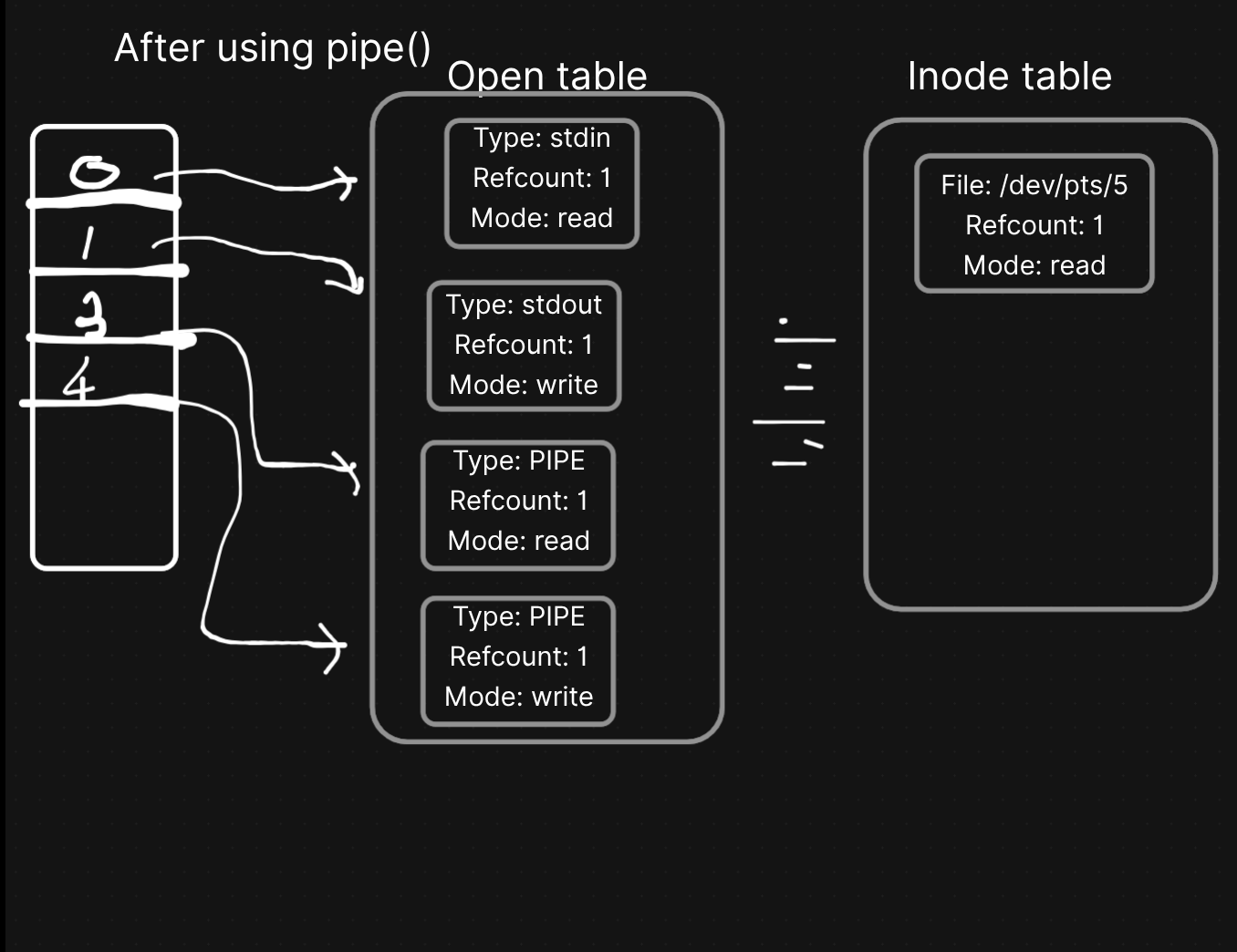
Step 2: After first fork() - Child 1 created
What happens? Same as any fork. The child gets its own copy of the FD table pointing to the SAME open file table entries. Reference counts go up.
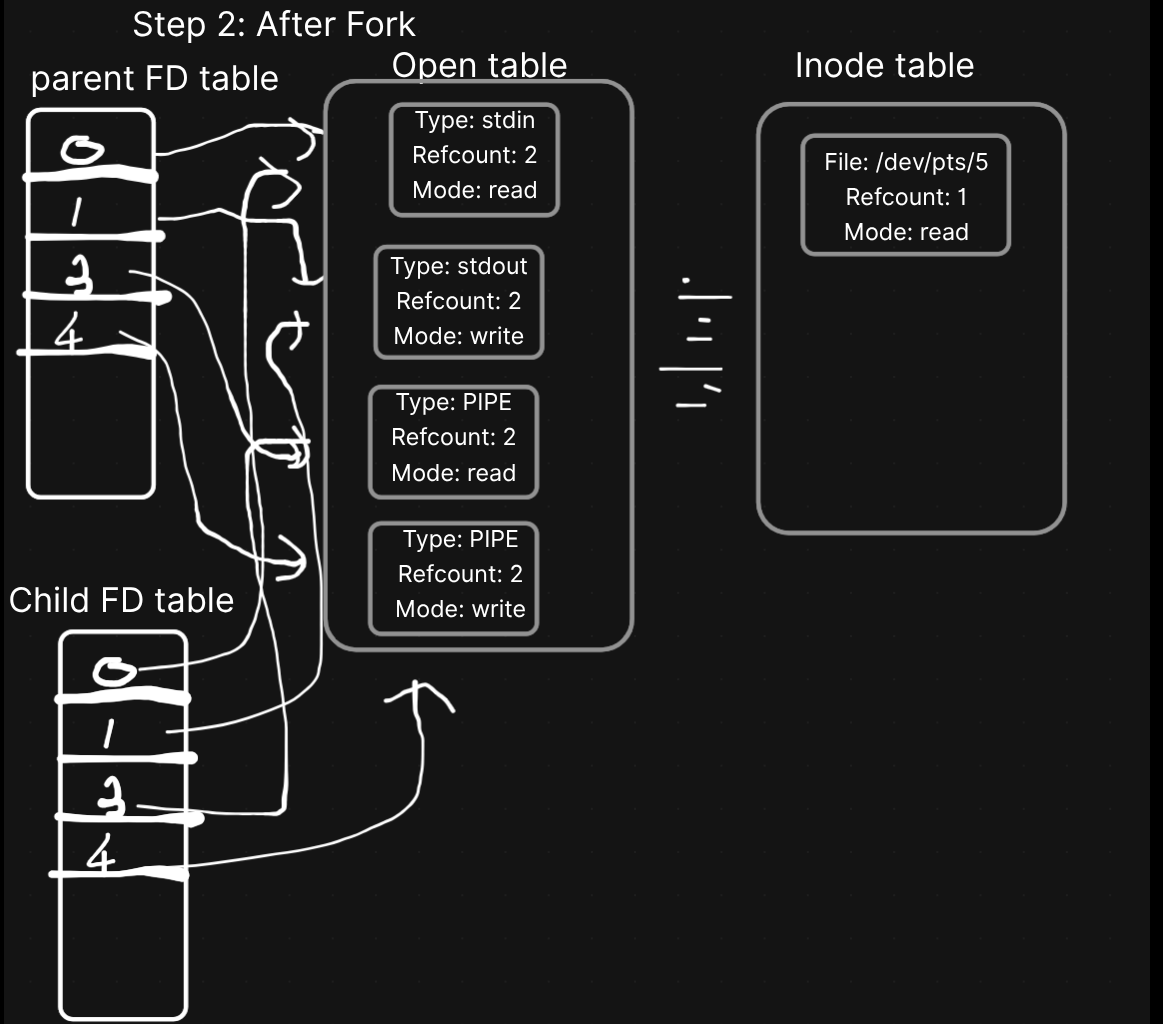
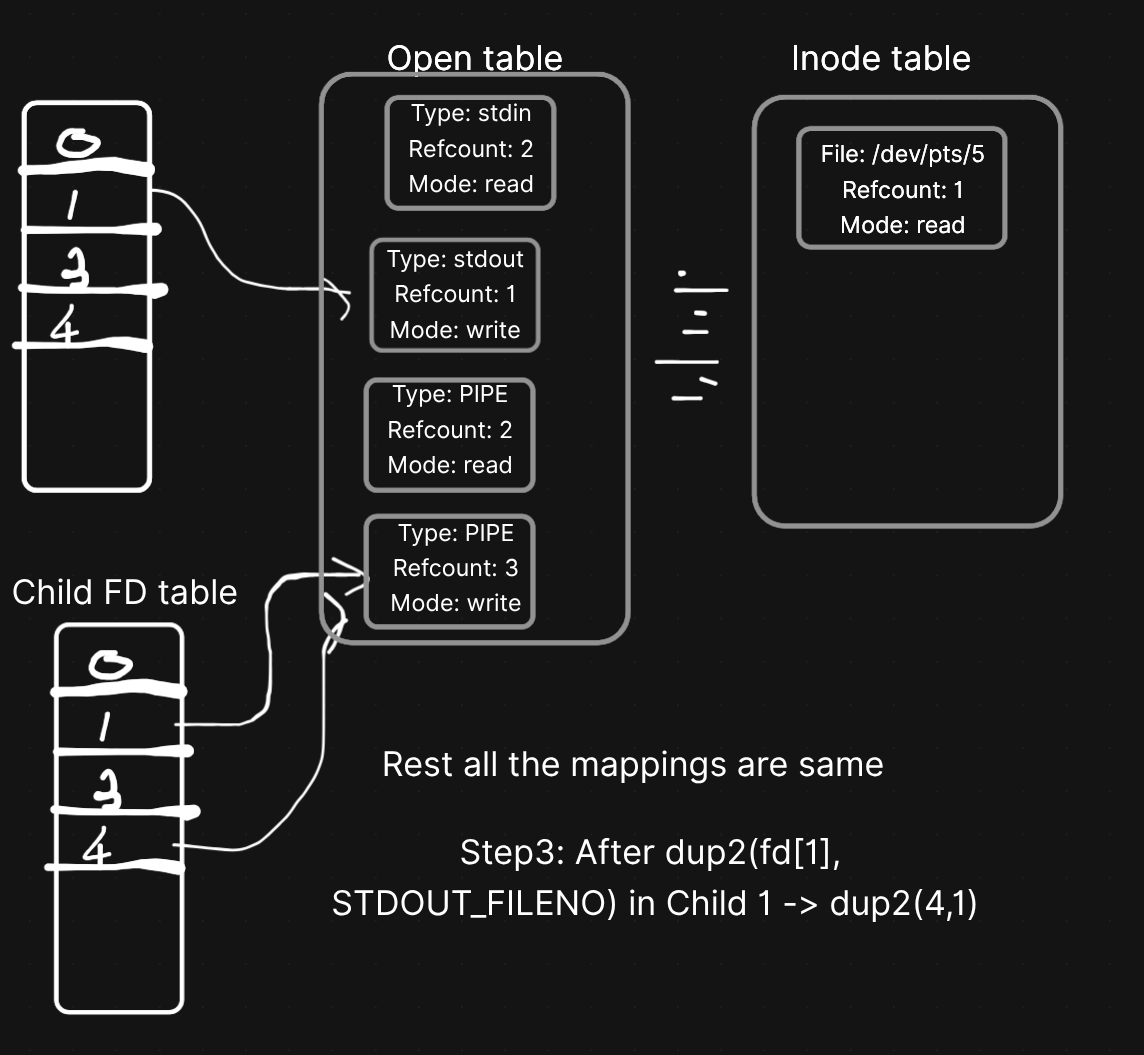
Step 3: Child 1 does dup2(fd[1], STDOUT_FILENO)
In Child 1, we call dup2(fd[1], 1). What happens? The stdout (fd 1) of Child 1 gets replaced by fd[1] which is fd 4 (the pipe write end).
So now in Child 1: fd 1 AND fd 4 both point to the pipe's WRITE end.
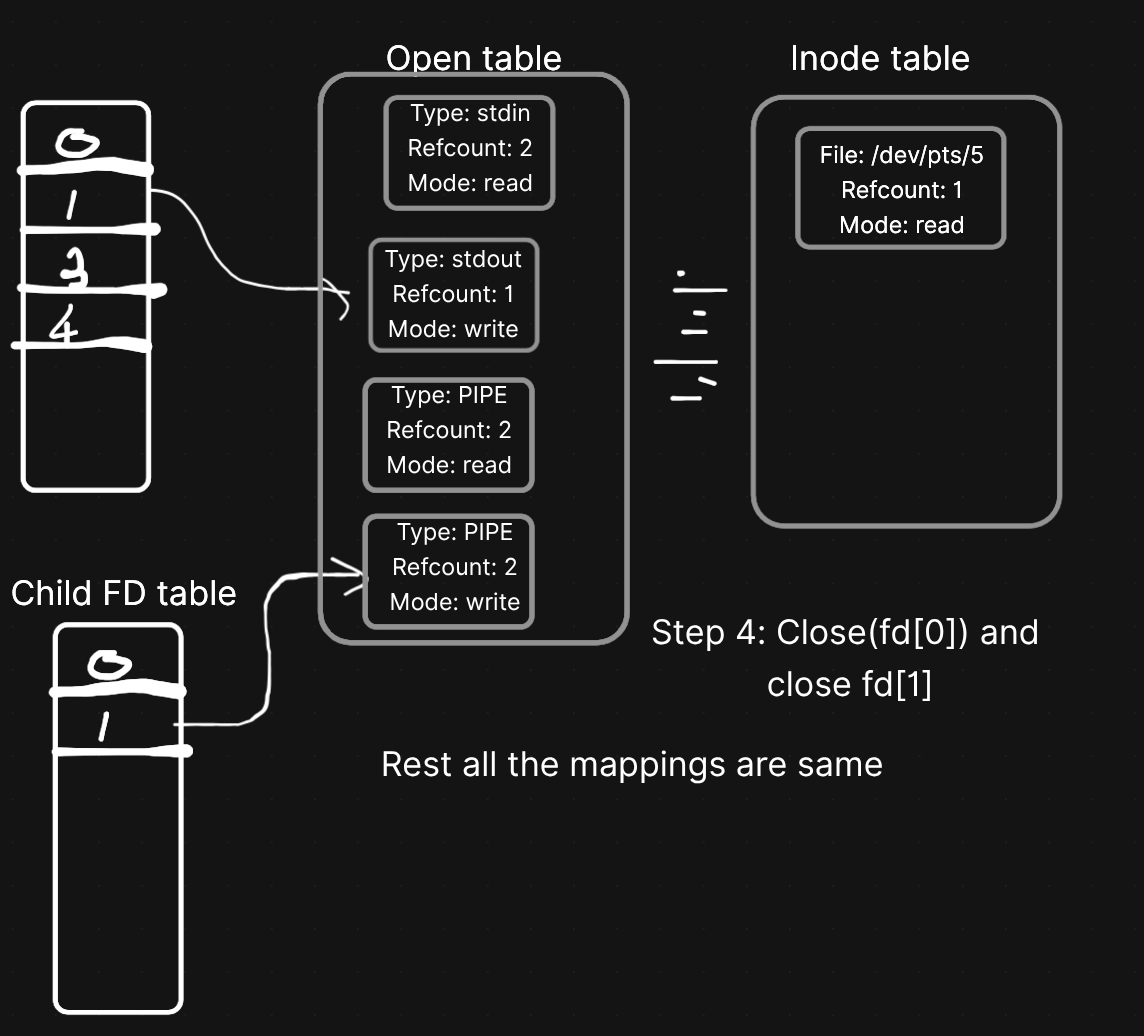
Step 4: Child 1 closes unused fds
Then we close the unused fds in Child 1 - close(fd[0]) and close(fd[1]). We already have stdout pointing to the pipe write end, so we don't need fd 3 and fd 4 anymore.
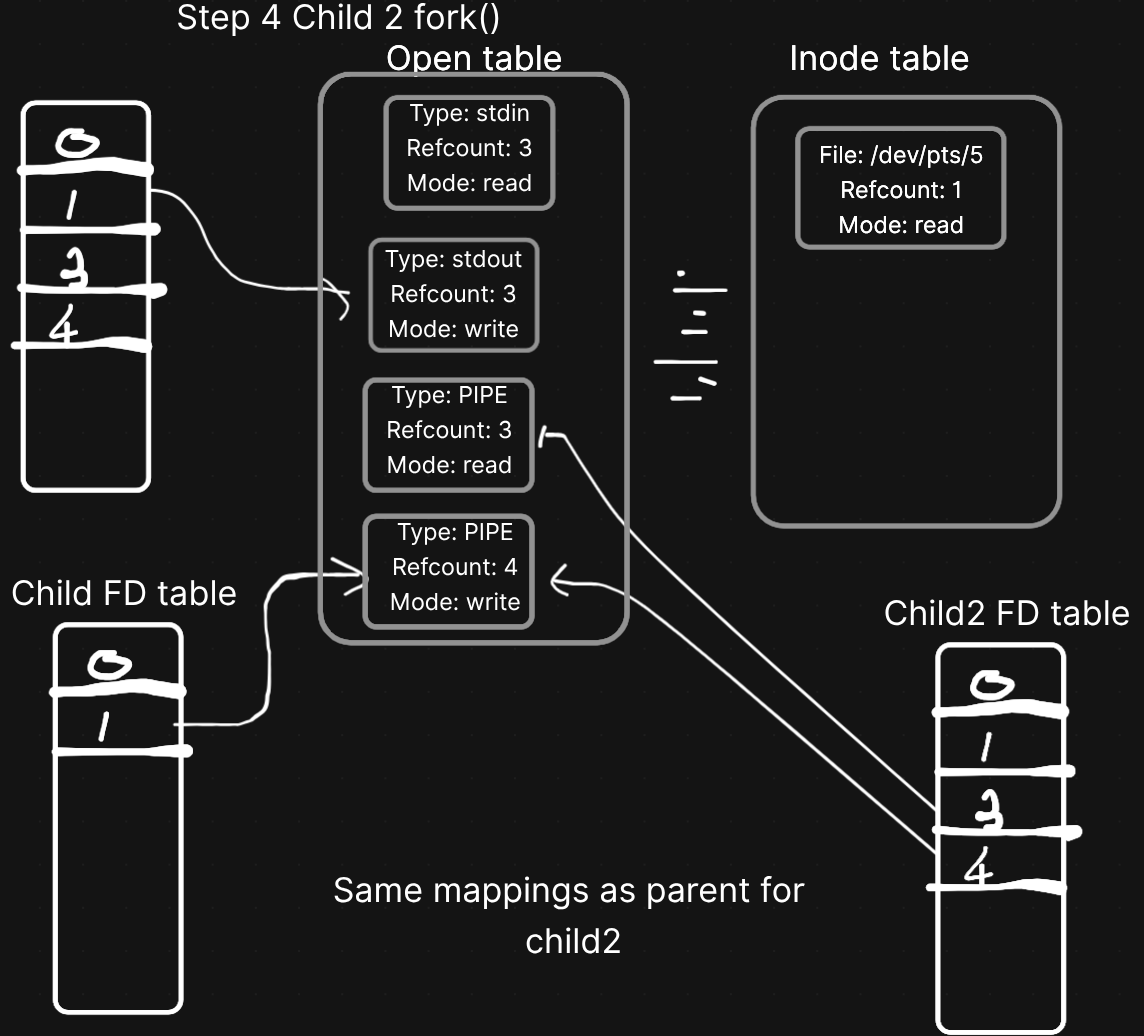
Step 5: After second fork()
We fork again from the parent to create Child 2. Same thing - Child 2 gets a copy of the parent's FD table (which still has fd 3 and 4 pointing to the pipe).
Step 6: The Full Picture - Data Flows Through the Pipe - Child 2 does dup2(fd[0], STDIN_FILENO)
Then Child 2 calls dup2(fd[0], 0). This replaces stdin (fd 0) with the pipe's READ end.
Now look at what we've built:
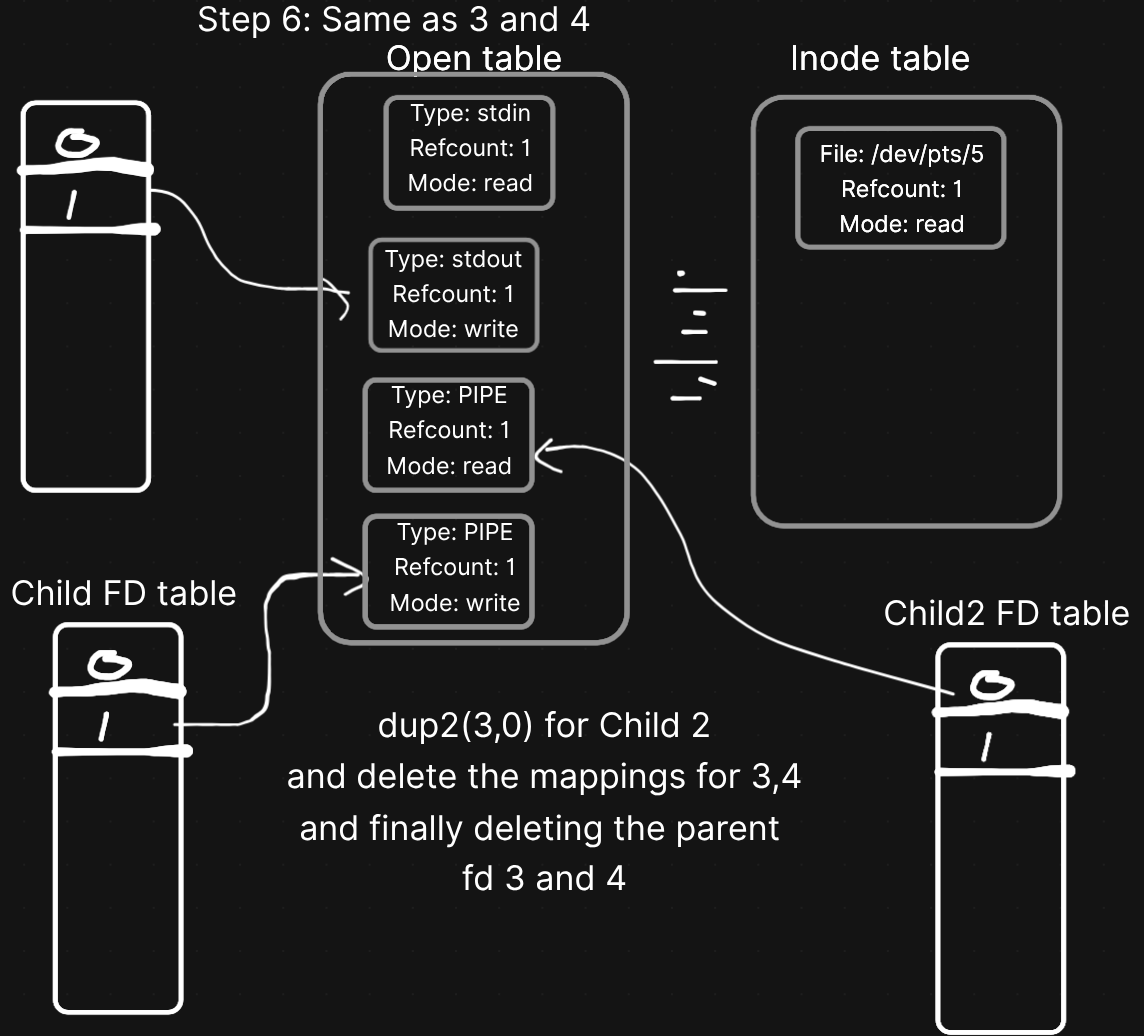
This is why it's called a pipe! It's literally like a physical pipe connecting two processes. Child 1 writes into one end, Child 2 reads from the other end.
The parent also closes its pipe fds (fd[0] and fd[1]) since it doesn't need them. Then it waits for both children to finish.
  Parent FD Table (final)
  +-----+
  | 0   | -> stdin
  | 1   | -> stdout
  | 2   | -> stderr
  | 3   | NULL (closed)
  | 4   | NULL (closed)
  +-----+

  Parent just calls wait(NULL) twice
  and waits for both children to finish.
And that's how ls | grep txt works under the hood. Pretty elegant right?
Summary
So to wrap it all up:
System I/O is just how the OS reads and writes files. Everything in Linux is a file - regular files, directories, sockets, pipes, devices.
Unix I/O is the raw system call layer - open, close, read, write, lseek. Direct but expensive per call.
Standard I/O is the buffered wrapper - fopen, fprintf, fclose. Handles buffering, so way fewer syscalls.
The 3 Kernel Tables:
FD Table (per process) -> Open File Table (system-wide) -> Inode Table (system-wide)
fork() copies the FD table but shares the open file table entries. Parent and child share the same file offset.
dup2(oldfd, newfd) replaces newfd with oldfd's entry. This is how shell redirection (>, <) works.
Pipes use pipe() + fork() + dup2() to connect stdout of one process to stdin of another.
This is the foundation of how Linux does I/O. Once you get this, networking, IPC, and all the fancy stuff is just the same concepts applied differently.
Will see you in the next one :-)